
Compress Your Images Before Uploading Them
If you upload images online (for example on your website), image size really matters. Most images are way heavier than they need to be, the same goes for images attached to emails. Screenshots are often uploaded without compression, which makes them much larger than JPEG images. This is usually because they are saved as PNG files and sometimes at a higher resolution than necessary. By using Squoosh, you can significantly reduce the file size while maintaining the same visual quality.
Big images slow everything down, often without you even noticing.
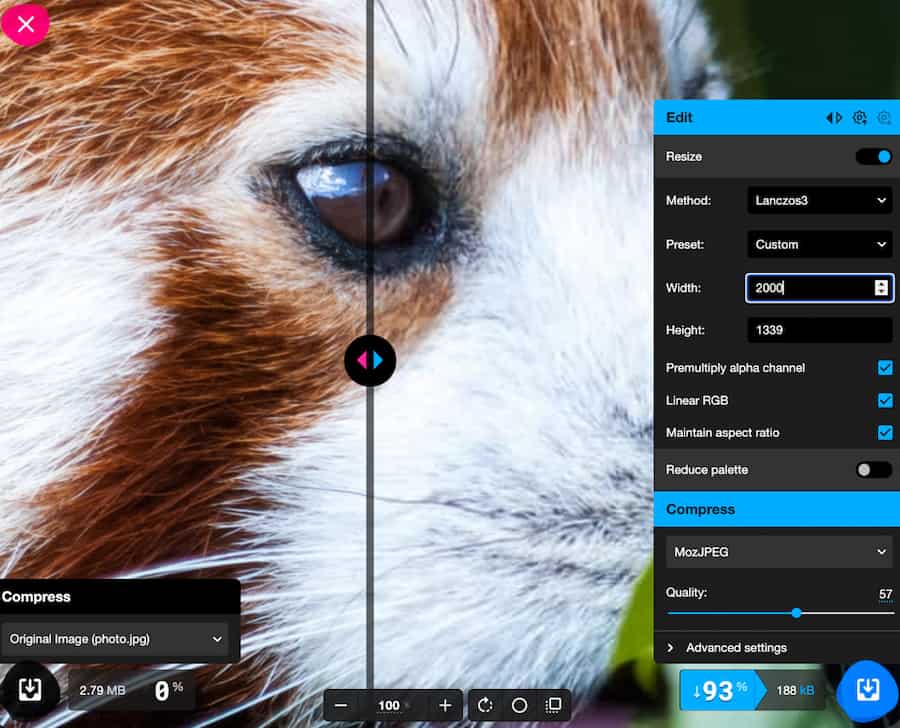
This image has been reduced from 2.79mb to 180k,
which is 93% smaller with the same quality (2000px width, size of a background image.
Reduce the size of your images by up to 98% with the same visual quality
I often see client images that are 5MB or more, simply because they didn’t know they could compress them easily.
Reducing image size can make a huge difference:
- Faster upload times
- Less bandwidth usage (important for hosting limits)
- Lighter web pages
- Lower energy consumption
- A more eco-friendly website
- Best results on websitecarbon.com
You don’t need to have Photoshop, you can use free online tools. My favourite at the moment is squoosh.
it does an amazing job.
Download the app and put it as a bookmark in your favourites.
http://www.squoosh.app